
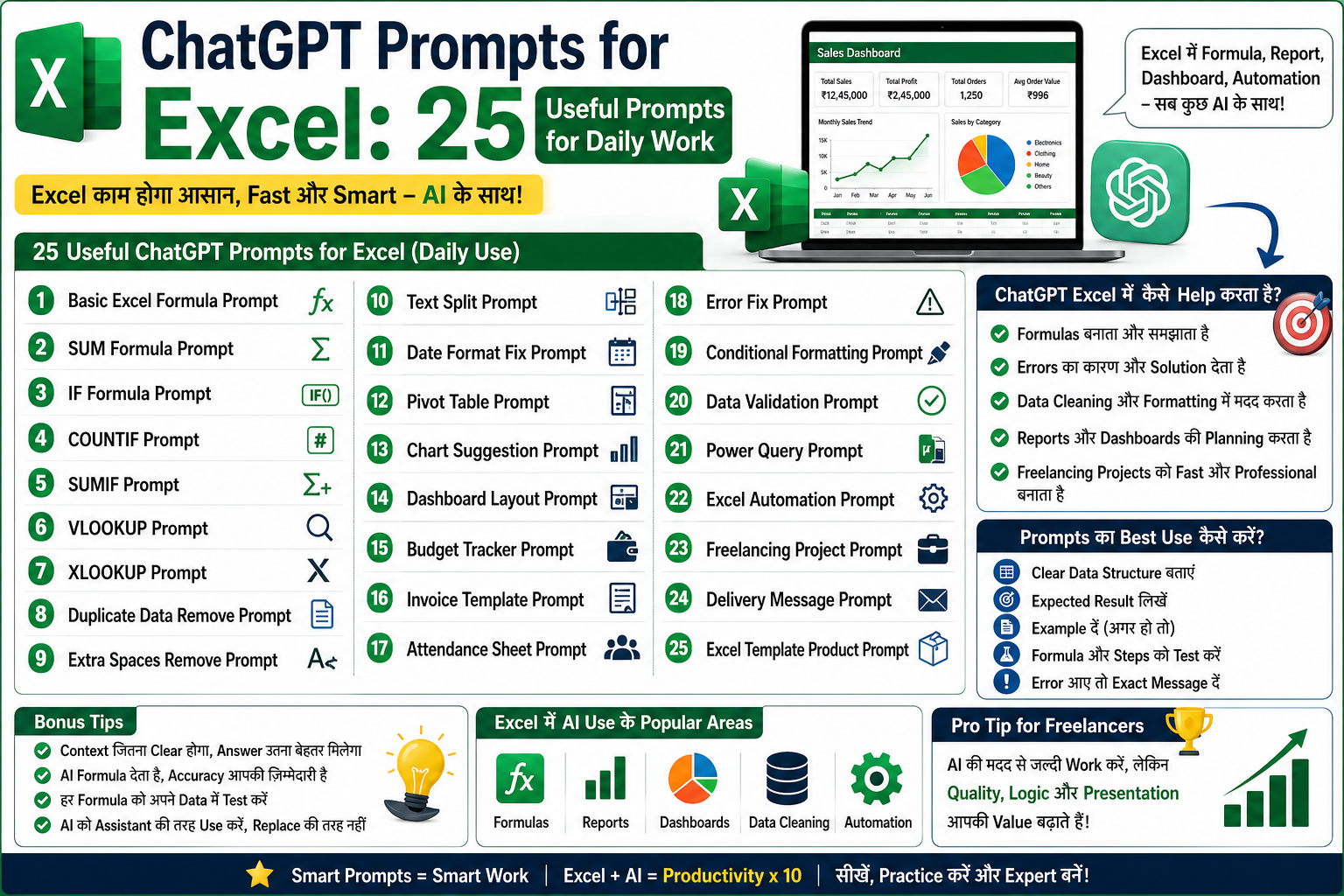
ChatGPT Prompts for Excel: Daily Work के लिए 25 Useful Prompts
Excel आज भी students, freelancers, business owners, accountants, data entry operators और professionals के लिए सबसे जरूरी tools में से एक है। लेकिन Excel में formulas, data cleaning, reports, dashboards और errors को handle करना कई बार difficult लग सकता है।
यहीं पर ChatGPT आपकी मदद कर सकता है।
ChatGPT से आप Excel formulas बनवा सकते हैं, errors समझ सकते हैं, dashboard ideas ले सकते हैं, reports plan कर सकते हैं और freelancing projects को faster complete कर सकते हैं।
इस blog में हम Excel daily work के लिए 25 useful ChatGPT prompts देखेंगे, जिन्हें आप copy करके अपने काम में use कर सकते हैं।
ChatGPT Prompts Excel में क्यों Helpful हैं?
ChatGPT आपको Excel में direct काम नहीं करके देता, लेकिन यह आपको सही formula, सही process और सही structure समझा सकता है।
ChatGPT Excel में मदद कर सकता है:
Formulas बनाने में
Formula समझाने में
Errors fix करने में
Data cleaning में
Reports बनाने में
Dashboard planning में
Pivot table ideas में
Client requirement समझने में
Freelancing delivery message लिखने में
Excel template structure बनाने में
अगर आप सही prompt लिखते हैं, तो ChatGPT आपको काफी useful answer दे सकता है।
Prompt लिखने का सही तरीका
Excel के लिए prompt लिखते समय clear details देना बहुत जरूरी है।
Weak prompt:
Excel formula बताओ।
Better prompt:
मेरे पास A column में product name, B column में quantity और C column में price है। D column में total amount निकालने के लिए Excel formula बताओ।
एक अच्छा Excel prompt लिखते समय ये details दें:
आपके data में कौन-कौन से columns हैं
आप क्या result चाहते हैं
Formula किस column में चाहिए
Condition क्या है
Excel version कौन सा है, अगर जरूरी हो
Example data हो तो include करें
अब देखते हैं 25 useful prompts.
1. Basic Excel Formula Prompt
Prompt:
मेरे पास A column में product name, B column में quantity और C column में price है। D column में total amount निकालने के लिए Excel formula बताओ और आसान भाषा में समझाओ।
Use:
यह prompt basic multiplication formula समझने के लिए useful है।
2. SUM Formula Prompt
Prompt:
मेरे पास B2 से B100 तक sales amount है। Total sales calculate करने के लिए Excel formula बताओ।
Use:
Sales, expenses, marks या amount total करने के लिए।
3. IF Formula Prompt
Prompt:
मेरे पास C column में marks हैं। अगर marks 40 या उससे ज्यादा हैं तो Pass दिखाना है, नहीं तो Fail। Excel IF formula बताओ।
Use:
Pass/Fail, Paid/Pending, High/Low जैसे conditions के लिए।
4. COUNTIF Prompt
Prompt:
मेरे पास D column में payment status है, जिसमें Paid और Pending values हैं। Paid orders count करने के लिए COUNTIF formula बताओ।
Use:
Status count करने के लिए।
5. SUMIF Prompt
Prompt:
मेरे पास A column में category और B column में amount है। Food category का total expense निकालने के लिए SUMIF formula बताओ।
Use:
Category-wise total निकालने के लिए।
6. VLOOKUP Prompt
Prompt:
मेरे पास Sheet1 में product code और price है। Sheet2 में product code enter करने पर price automatically लाना है। VLOOKUP formula बताओ और समझाओ।
Use:
Product price, employee details, student records जैसी lookup tasks के लिए।
7. XLOOKUP Prompt
Prompt:
मेरे पास product code और product price का data है। Product code enter करने पर price लाने के लिए XLOOKUP formula बताओ। VLOOKUP से इसका difference भी समझाओ।
Use:
Modern lookup tasks के लिए।
8. Duplicate Data Remove Prompt
Prompt:
मेरी Excel sheet में duplicate customer records हैं। Duplicate data identify और remove करने का best तरीका बताओ।
Use:
Data cleaning projects के लिए।
9. Extra Spaces Remove Prompt
Prompt:
मेरी Excel sheet में names के आगे और पीछे extra spaces हैं। इन्हें clean करने के लिए formula और steps बताओ।
Use:
Messy text data clean करने के लिए।
10. Text Split Prompt
Prompt:
मेरे पास A column में full name है। मुझे first name और last name अलग-अलग columns में चाहिए। Excel में यह कैसे करें?
Use:
Names, address, code या combined data split करने के लिए।
11. Date Format Fix Prompt
Prompt:
मेरे पास dates अलग-अलग format में हैं। Excel में date format को dd-mm-yyyy में convert करने के steps बताओ।
Use:
Reports और data cleaning के लिए।
12. Pivot Table Prompt
Prompt:
मेरे पास sales data है जिसमें Date, Product, Category, Sales और Profit columns हैं। इस data से pivot table बनाकर monthly sales summary कैसे बनाएं?
Use:
Large data को summarize करने के लिए।
13. Chart Suggestion Prompt
Prompt:
मेरे पास monthly sales data है। इस data को present करने के लिए कौन-कौन से Excel charts best रहेंगे और क्यों?
Use:
Dashboard और report presentation के लिए।
14. Dashboard Layout Prompt
Prompt:
मुझे Excel में sales dashboard बनाना है। इसमें कौन-कौन से sections, KPIs, charts और tables होने चाहिए?
Use:
Professional dashboard planning के लिए।
15. Budget Tracker Prompt
Prompt:
मुझे Excel में monthly budget tracker बनाना है। इसके लिए sheets, columns, formulas और dashboard sections suggest करो।
Use:
Budget template या personal finance tracker बनाने के लिए।
16. Invoice Template Prompt
Prompt:
मुझे Excel में professional invoice template बनाना है। इसमें कौन-कौन से fields, formulas और layout होने चाहिए?
Use:
Freelancers और small businesses के लिए invoice design करने में।
17. Attendance Sheet Prompt
Prompt:
मुझे Excel में attendance tracker बनाना है। इसमें present, absent, total working days और attendance percentage calculate करने के लिए structure और formulas बताओ।
Use:
School, coaching, office attendance tracker के लिए।
18. Error Fix Prompt
Prompt:
मेरे Excel formula में #VALUE! error आ रहा है। इस error के common reasons और fix करने के steps बताओ।
Use:
Formula errors समझने के लिए।
19. Conditional Formatting Prompt
Prompt:
मेरे पास inventory stock data है। अगर stock 10 से कम है तो row red highlight करनी है। Excel में conditional formatting कैसे करें?
Use:
Low stock alert, overdue task, pending payment highlight करने के लिए।
20. Data Validation Prompt
Prompt:
Excel में payment status के लिए Paid, Pending और Cancelled का dropdown कैसे बनाएं?
Use:
Clean data entry और status tracking के लिए।
21. Power Query Prompt
Prompt:
Excel Power Query का beginner-friendly explanation दो और बताओ कि data cleaning में इसका use कैसे होता है।
Use:
Advanced Excel data cleaning के लिए।
22. Excel Automation Prompt
Prompt:
मेरे daily sales report में same steps repeat होते हैं। Excel में इस process को automate करने के लिए कौन-कौन से options हैं?
Use:
Macros, Power Query, formulas और template automation समझने के लिए।
23. Freelancing Project Prompt
Prompt:
Client ने कहा है कि उसे Excel sales dashboard चाहिए। इस requirement को समझने के लिए मुझे client से कौन-कौन से questions पूछने चाहिए?
Use:
Fiverr/Upwork client communication के लिए।
24. Delivery Message Prompt
Prompt:
मैंने client का Excel dashboard project complete कर दिया है। Client को भेजने के लिए professional delivery message लिखो।
Use:
Freelancing delivery के लिए।
25. Excel Template Product Prompt
Prompt:
मैं monthly budget Excel template अपनी website पर sell करना चाहता हूं। इसके लिए features, sheets, formulas और product description suggest करो।
Use:
Digital product planning और selling के लिए।
Bonus: ChatGPT से Better Excel Answer कैसे लें?
ChatGPT से better answer पाने के लिए हमेशा context दें।
Example:
मेरे पास यह columns हैं:
Date, Product, Quantity, Price, Salesperson
मुझे result चाहिए:
Product-wise total sales
मुझे output चाहिए:
Excel formula और short explanation
इस तरह का prompt ChatGPT को clear direction देता है।
ChatGPT Excel Prompts का Best Use कैसे करें?
Best तरीका:
पहले अपना data structure explain करें
फिर expected result बताएं
Formula को test करें
अगर error आए तो error message paste करें
ChatGPT से formula explain करवाएं
Final file manually check करें
Important बात:
ChatGPT formula दे सकता है, लेकिन आपको उसे अपने actual data में test जरूर करना चाहिए।
Common Mistakes
Excel prompts लिखते समय beginners ये mistakes करते हैं:
Column details नहीं बताते
Expected output clear नहीं बताते
गलत या incomplete data example देते हैं
Formula को test नहीं करते
Error आने पर exact error message नहीं बताते
Excel version mention नहीं करते
एक ही prompt में बहुत सारे tasks पूछते हैं
इन mistakes से बचेंगे तो आपको better answers मिलेंगे।
Excel Freelancers के लिए Prompt Strategy
अगर आप Fiverr या Upwork पर Excel service देते हैं, तो ChatGPT आपकी productivity बढ़ा सकता है।
आप ChatGPT से ये काम करवा सकते हैं:
Client requirement breakdown
Question list
Formula suggestions
Dashboard structure
Project timeline
Delivery message
Revision reply
Gig description
Portfolio project ideas
Example prompt:
Client ने यह message भेजा है: [client message]. इसे पढ़कर मुझे project scope, required questions, estimated deliverables और reply message बनाकर दो।
Beginner Action Plan
Day 1:
Basic formulas के prompts use करें।
Day 2:
IF, COUNTIF और SUMIF prompts practice करें।
Day 3:
Data cleaning prompts use करें।
Day 4:
Dashboard layout prompt try करें।
Day 5:
Budget tracker या invoice template prompt use करें।
Day 6:
Freelancing client communication prompts use करें।
Day 7:
एक complete Excel template idea बनाएं और उसे improve करें।
Conclusion
ChatGPT Excel users के लिए बहुत helpful assistant बन सकता है। अगर आप सही prompt लिखना सीख लेते हैं, तो formulas, reports, dashboards, data cleaning, errors और freelancing projects काफी आसान हो सकते हैं।
लेकिन याद रखें, ChatGPT output को हमेशा test और verify करें। Excel में accuracy बहुत important होती है।
इन 25 prompts को daily work में use करें और धीरे-धीरे अपने काम के हिसाब से prompts customize करें।
अगर आप Excel, AI और freelancing skills practical तरीके से सीखना चाहते हैं, तो Viznova पर आपको guides, templates और live sessions मिलेंगे जो आपको step-by-step help करेंगे।
Your Comments & Ratings
No comments yet. Be the first to share your thoughts.